M. JAHIN
INCS-Culminating
INCS 4810 Culminating Project
Technical Report
Project AquaSentinel
Instructor: Victor Mendez & Derek Jamensky
Date of Submission: 23rd MAY 2025
Team Members: Md Muhtashim, Jahin | Malhotra, Deval |Chhipa, Saif
Executive Summary
In recent years, cyber threats have grown remarkably and become one of the most significant threats to modern businesses. These threats not only target Information Technology infrastructure but have also begun to affect Critical Infrastructures. At this time, the security of Industrial Control Systems (ICS) is crucial, as breaches can directly impact health, the environment, and safety. Our team aims to assess AquaSentinel’s network to identify vulnerabilities, improve network efficiency, and enhance security.
This technical report has a detailed analysis of the AquaSentinel’s network, highlighting found vulnerabilities, firewall misconfigurations, poor segmentations, and lack of application control. Furthermore, we have reviewed the Python web server code that has a critical vulnerability that allows an attacker to inject SQL queries directly into the login page. This report provides Proof of Concept of how the vulnerabilities have been patched.
Project Details Summary
Our team first started with devices that are in a Demilitarized Zone (DMZ) and exposed to the public internet. Services such as Webserver and FTP server are open to the public internet and internal network for employees to access companies’ resources.
Mitigating Existing Vulnerabilities
Application Security – SQL Injection Remediation
Identified and remediated a critical SQL Injection vulnerability that exposed sensitive user credentials in the company’s portal [Fig 1.0 & 1.1]. Conducted in-depth analysis of the web application code to locate insecure input handling, which allowed attackers to inject malicious SQL queries through the user input field [Fig 1.2 & 1.3]. The attack enabled unauthorized access to database contents, including table structures and user credentials. Implemented secure coding practices and input validation measures to prevent injection attacks and safeguard database integrity [Fig 1.4].
System Hardening – vsftpd Backdoor Vulnerability (CVE-2011-2523)
Addressed a critical vulnerability in the organization’s vsftpd 2.3.4 FTP server, which contained a backdoor enabling remote shell access via TCP port 6200 [Fig 1.5]. The malicious version, intentionally introduced into the software distribution, was easily exploitable using Metasploit or manual FTP client connections. Patched the system by replacing the compromised service with a secure version and validated system integrity to prevent future unauthorized access [Fig 1.6].
System Hardening – Exposed WinRM Service
Identified and analyzed the exposure of the Windows Remote Management (WinRM) service, which allowed attackers to gain remote shell access using tools like EvilWinRM when weak or compromised credentials (e.g., via SQL Injection [Fig 1.1]) were available.
This vulnerability was leveraged in post-exploitation scenarios for lateral movement and privilege escalation across the enterprise network. Mitigated the risk by disabling unnecessary WinRM access, restricting external access to the Enterprise Zone, and enforcing Two-Factor Authentication through Azure Entra ID.
Strengthening Network Security
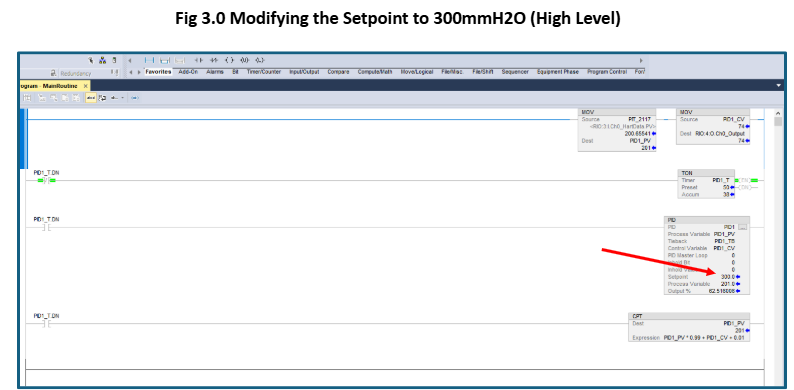
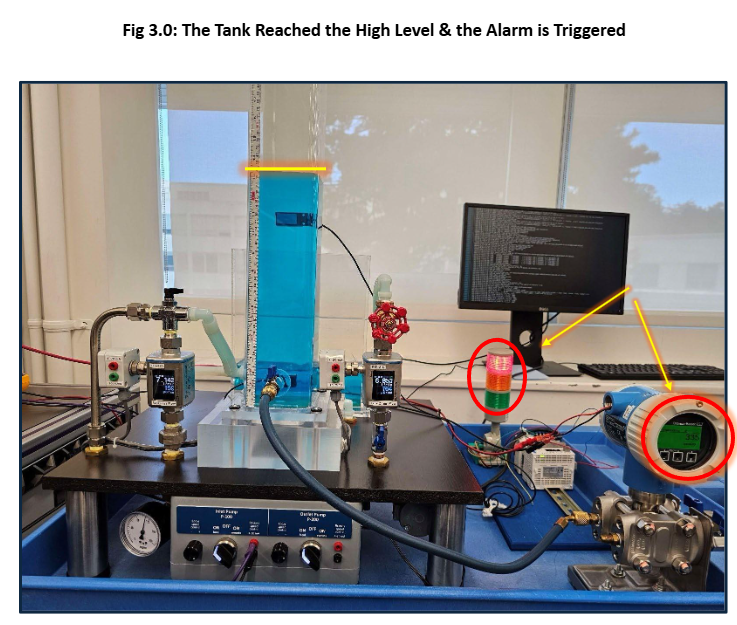
The cyberattack often escalates due to poorly defined network boundaries, allowing attackers to pivot laterally from one compromised network to another. Our penetration testing report highlights multiple pathways an attacker can use to hijack the control system. As demonstrated in Figure 3.0, the attacker pivoted from the FTP server to the Enterprise Domain Controller, and from there, it successfully overridden the setpoint and was able to hijack the system.
Detailed Segmentation
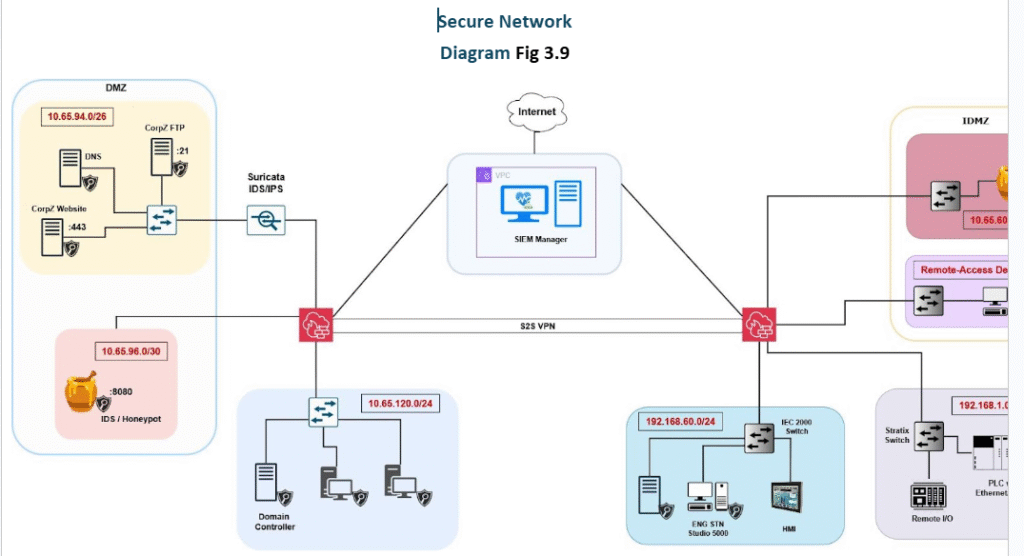
We conducted a thorough assessment of the organization’s network and implemented logical segmentation in alignment with ISA/IEC 62443. Devices were grouped into zones and conduits based on their function and security level [Fig 2.0]. This structure enabled quicker containment during future incidents and ensured secure communication between zones.
Strict Firewall Policies
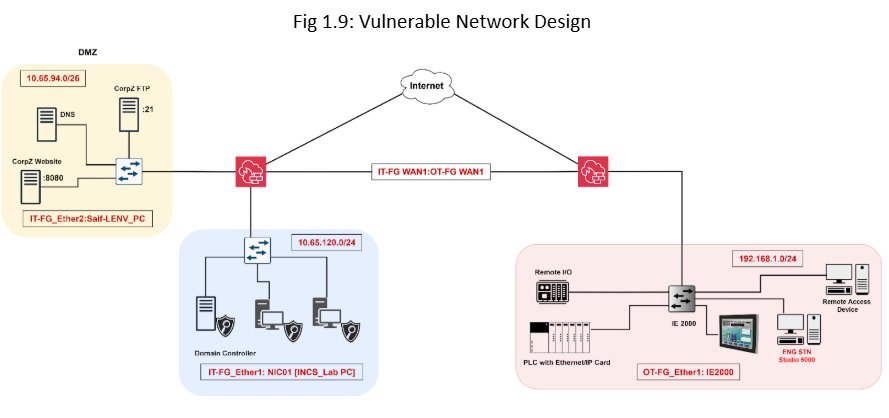
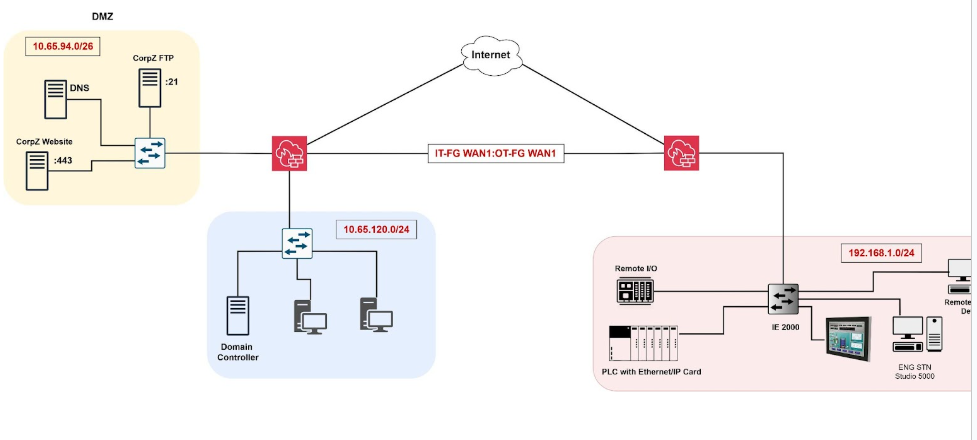
Despite some existing segmentation (see “Appendix: Vulnerable Network Diagram”), the attacker was able to enumerate the network due to permissive traffic rules. To mitigate this, we enforced strict firewall policies that control traffic flow based on protocol type and zone boundaries [Fig 2.3], significantly reducing the attack surface.
Isolated Remote Access Zone
A major risk identified was a remote access (RDP) enabled device directly connected to the control zone (see “Appendix: Vulnerable Network Diagram”). The attacker pivoted to the RDP-enabled device from the IT network. Additionally, this device allowed the attacker to learn about the control environment by accessing the PLC’s webpage (hosted locally). The attacker leveraged that vulnerability and manipulated the PLC, disrupted HMI operations, and rendered the plant unmanageable. We addressed this by creating a dedicated zone for remote access devices, isolated from critical control infrastructure.
Improving Security Posture
Following Phase 1: Mitigating Existing Vulnerabilities and Phase 2: Strengthening Network Security, we will move forward with Phase 3: Improving Security Posture. This phase included the deployment of IDS/IPS, SIEM, honeypots, EDR solutions, and the establishment of an Industrial Demilitarized Zone (IDMZ).
Honeypot Deployment
Deployed KFSensor to simulate services such as SSH, Telnet, HTTP, and SMTP to lure and monitor attackers [Fig 3.3]. These honeypots were intentionally configured with low-level vulnerabilities (e.g., open ports, weak credentials) to divert attackers away from production systems and provide valuable threat intelligence. In the OT environment, we also deployed Conpot, an ICS-specific honeypot, within the IDMZ to monitor malicious activity targeting industrial control systems.
Intrusion Detection & Prevention System (IDS/IPS)
We installed Suricata between the Internet and DMZ to detect and block suspicious traffic [Fig 2.1]. Suricata operates in both IDS and IPS modes, providing real-time threat detection and mitigation. This setup helps monitor external-facing systems such as honeypots, web servers, and an FTP server to reduce exposure from public networks.
Endpoint Detection and Response (EDR)
Deployed Wazuh agents across IT and OT endpoints (host devices) for continuous monitoring of host activities. The Wazuh Manager was deployed in the cloud, enabling centralized visibility and management. These agents support threat detection, compliance monitoring, and vulnerability assessment at the endpoint level [Fig 3.5].
Security Information and Event Management (SIEM)
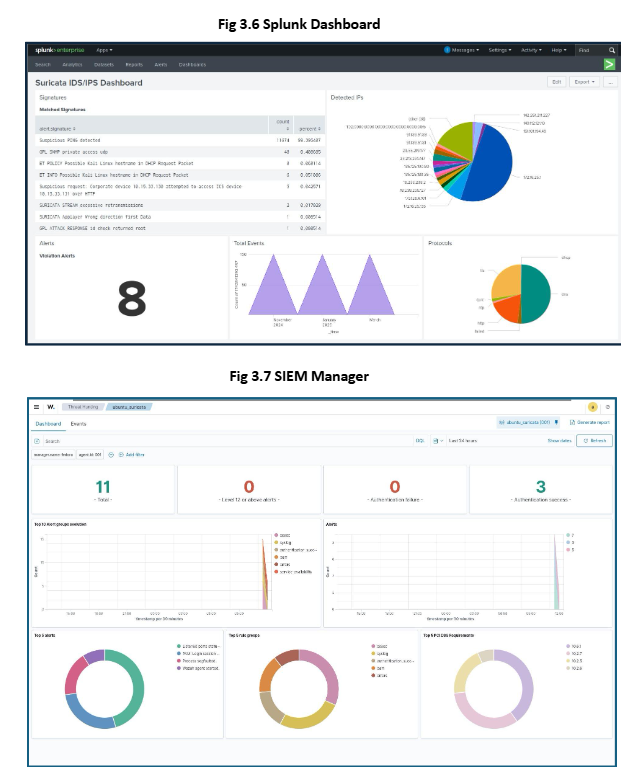
Implemented centralized logging and correlation using Wazuh SIEM and Splunk. Logs from IDS/IPS, honeypots, firewalls (FortiGate), and Cisco devices are forwarded via syslog and SNMP to Splunk [Fig 3.6]. Logs from End devices are forwarded via agents to Wazuh. Custom dashboards on Wazuh Manager integrate threat feeds from multiple sources, supporting threat hunting and anomaly detection [Fig 3.7].
Industrial Demilitarized Zone (IDMZ)
Established a dedicated IDMZ for the OT network. Remote access devices and ICS honeypot (Conpot) were placed within the IDMZ to reduce risk while allowing necessary connectivity from the Internet and within the internal network. The IDMZ enforces strict segmentation policies and enhances monitoring and logging between trusted and untrusted zones, in alignment with ISA/IEC 62443.
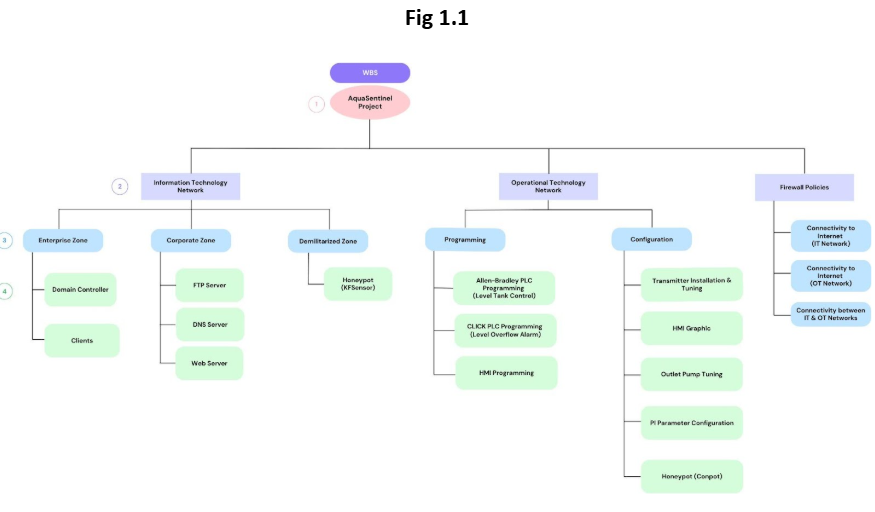
Work Breakdown Structure (WBS)
Introduction
In the evolving landscape of cybersecurity, protecting Industrial Control Systems (ICS) from sophisticated cyber threats has become a high priority for Industrial infrastructures. The AquaSentinel project aims to provide end-to-end documentation of the process, from the initial design and deployment of IT and OT networks to the identification and exploitation of vulnerabilities, and ultimately, the implementation of effective countermeasures. Through this controlled environment, the report demonstrates how attackers can move laterally across network boundaries, gain control of industrial assets, and impact physical processes. Finally, the report outlines mitigation strategies guided by the IEC 62443 standard to strengthen the network’s resilience and restore secure operations.
Zones & Assets
AquaSentinel’s Cybersecurity Team aims to design, assess, and secure the Industrial infrastructure. The network is divided into three zones: Information Technology (IT) Network, Operational Technology (OT) Network, and Demilitarized Zone. The 3 zones are connected through 2 FortiGate firewalls (1 IT Firewall & 1 OT Firewall). The Demilitarized Zone is the external internet-facing zone.
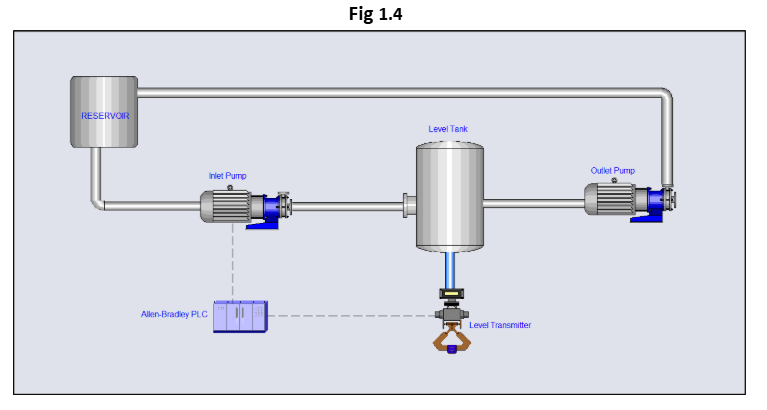
The ICS/OT plant is a water level control system. This system includes an Allen Bradley PLC, an HMI, an engineering workstation, and a physical plant consisting of a reservoir, a level tank, a level transmitter, an inlet pump, and an outlet pump. The PLC implements a Proportional-Integral (PI) control loop to regulate the pumps based on real-time level data from the transmitter, ensuring the tank maintains a predefined setpoint. The HMI provides visualization and control, while the engineering station allows for logic configuration and tuning.
The IT zone functions as the enterprise business network and includes an Active Directory Domain Services (AD DS) server acting as the Domain Controller for the domain aquasentinel.com. Multiple domain-joined client machines are connected within this zone. This zone plays a critical role in user authentication, centralized management, and inter-zone communication with the ICS network.
The DMZ serves as a controlled boundary that enables secure communication between external users and selected internal services. It includes a corporate web server hosting the organization’s public login portal, a DNS server, and an FTP server. These services are required to be accessible from the internet to support legitimate business functions such as remote access for employees, partner integrations, public domain name resolution, and file sharing.
Attack Methodology
The attacker discovers that the aquasentinel.com web portal is vulnerable to SQL injection. By exploiting the SQL vulnerability, he harvested user credentials. He did an NSlookup on the website to find the IP address and ran a network mapper scan to find out what other services were running on that server. After scanning, the attacker identifies that an old version of the FTP service is running on the Server. The vsftpd 2.3.4 version contains a backdoor that opens a shell on port 6200/TCP. The attacker establishes a remote shell connection with the server.
While navigating through the file system, the attacker discovers a P&ID graphic related to the HMI interface, revealing the presence of an ICS plant connected to the broader network. By digging deeper into the ftp logs of the server, he finds out about the Enterprise Zone of our ICS Plant Network. He runs another network mapper on the Enterprise Network Subnet and discovers the Domain Controller Server. Using the Evil-WinRM tool, he dumps the credentials he harvested through the SQL Injection and gains access to the Domain Controller. Subsequently, he runs a Python script which is called the “impacket secretdump”, which needs the IP address and an authentication credential to retrieve the encrypted password hash of all users inside the Domain Controller.
He uses the administrator’s password hash and username with the Evil-WinRM tool and gains privileged access. He changes the Administrator password and opens a Remote Desktop (RDP) connection to the Enterprise Zone Domain Controller. While navigating through the Active Directory Users and Computers, he discovers an Organizational Unit (OU) called Field Devices, which had a LocalAdmin user and had changed the password. Using Netstat, he gets to know that the domain controller is listening from a 192.168.1.25/24 IP (OT Network) on 4840 port (OPC UA), which is sending the status of the controller to the Domain Controller for monitoring.
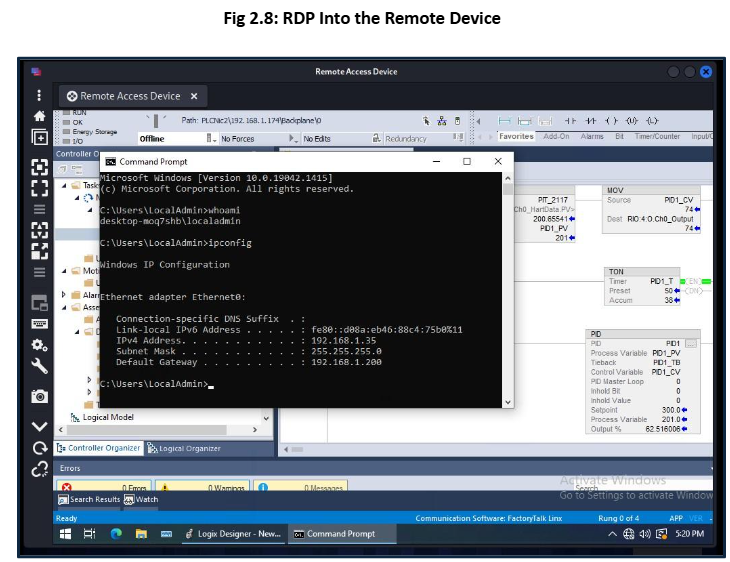
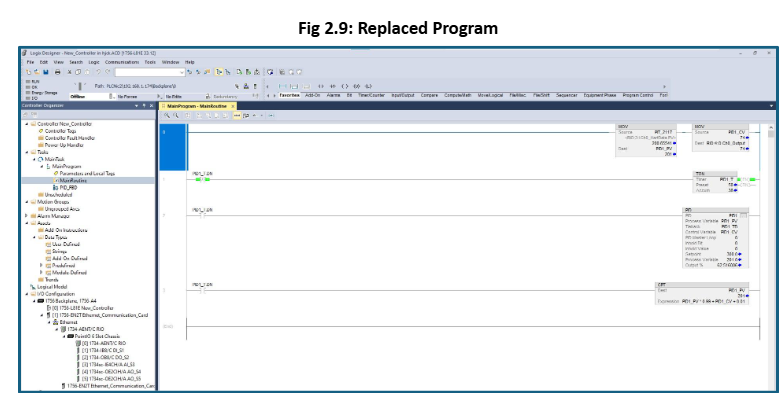
The attacker runs another network mapper scan on the Operational Technology (OT) Network, that same device had 20000/DNP3 (Distributed Network Protocol 3) port open, which is used by Industrial SCADA systems that enable communication between remote devices and control devices. Additionally, the network scan reveals another device with an open RDP/3389 port, identified as the Remote Access Device within the OT network. Using the LocalAdmin user credentials, he gets access to the Remote Access Device, which has a connection to the PLC. He opens Studio 5000 and uploads his own Ladder Logic to the PLC. As a result, the HMI gets disconnected from the PLC, the tank overflows, alarms get activated, the operator loses control, and AquaSentinel gets pawned!
Project Details
The Project Details section provides a comprehensive guide on how our team will conduct penetration testing and vulnerability assessment on AquaSentinel’s network to identify vulnerable applications, unpatched services, and poor security configurations. After the assessment and exploitation, our team will provide a holistic approach to patching vulnerabilities, securing applications, and improving the overall security of the network.
This report focuses on securing the network and contains just an overview of how the vulnerabilities were exploited and the advantages taken by the attacker of weak firewall policies. For a detailed guide on how the attacker discovered each vulnerability and to understand how they were exploited, please refer to the “Vulnerability Assessment & Penetration Testing Report”.
Our team will follow three phases to secure the network and enable continuous monitoring.
Phase 1: Identifying & Mitigating Existing Vulnerabilities
Phase 2: Improving Security Posture
Phase 3: Recommendations
Identifying & Mitigating Existing Vulnerabilities
Our team will begin with patching the critical vulnerabilities found in the Vulnerability Assessment (Penetration Testing) report. These vulnerabilities can potentially compromise the whole infrastructure and can result in greater damage to businesses if exploited.
Application Security
Vulnerability: SQL Injection
Our first step is to patch the SQL injection vulnerability that exposed the company’s user database. This database contains usernames and passwords that employees use to log in to the company’s portal. The attack can be executed by injecting an SQL query into the username field on the company’s website.
A SQL injection attack consists of insertion or “injection” of a SQL query via the input data from the client to the application. A successful SQL injection exploit can read sensitive data from the database, modify database data (Insert/Update/Delete), execute administration operations on the database (such as shutdown the DBMS), recover the content of a given file present on the DBMS file system and in some cases issue commands to the operating system. SQL injection attacks are a type of injection attack, in which SQL commands are injected into data-plane input in order to affect the execution of predefined SQL commands. [1]
Exploitation
Fig 1.0: SQL Injection [Tables]
Query: SHOW Databases;
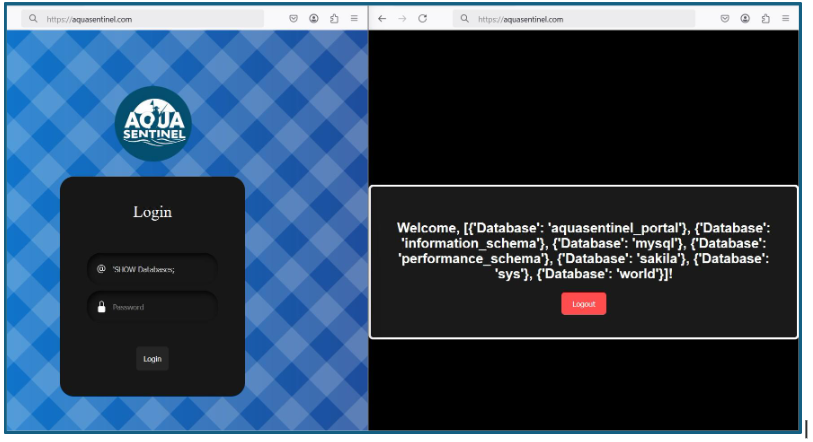
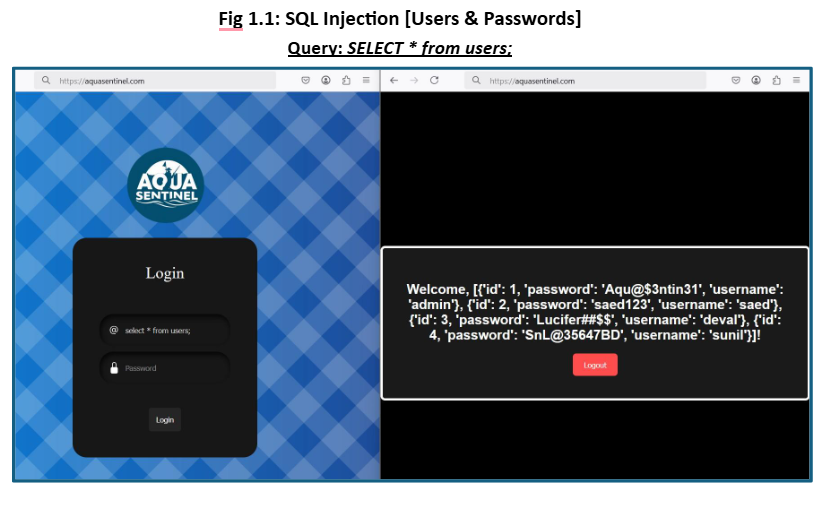
As demonstrated in the attack, the SQL Injection revealed information such as the tables that exist in the databases and the usernames and associated passwords with them. To address this vulnerability, we will review the web application code to identify any weaknesses.
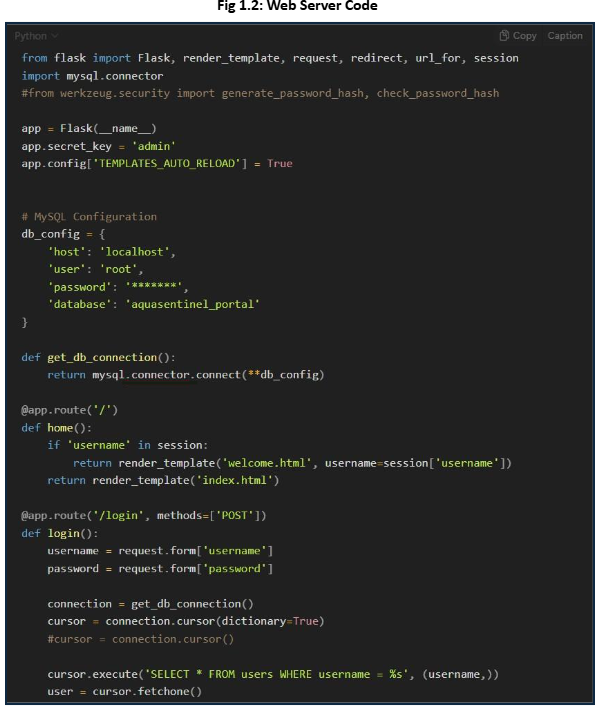
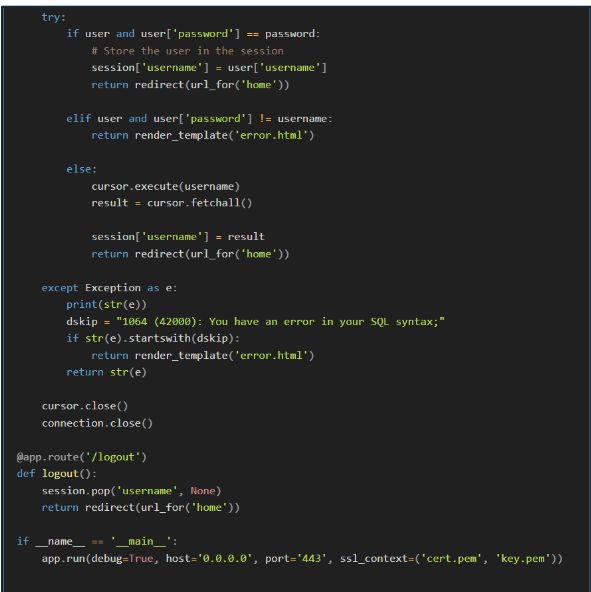
After reviewing the code, we have sanitized the input fields on the website to inspect the values submitted and validate them against the entries in the user database. This sanitization and validation process will help prevent future attacks and strengthen the overall security of the code.
As demonstrated in the exploitation, the passwords associated with usernames were stored in plain text, which is a poor security practice. Therefore, we will store passwords as hashed values. Our team will ensure that passwords are stored using SHA-512 hash. This approach will help maintain the confidentiality of the user database even if it is compromised.
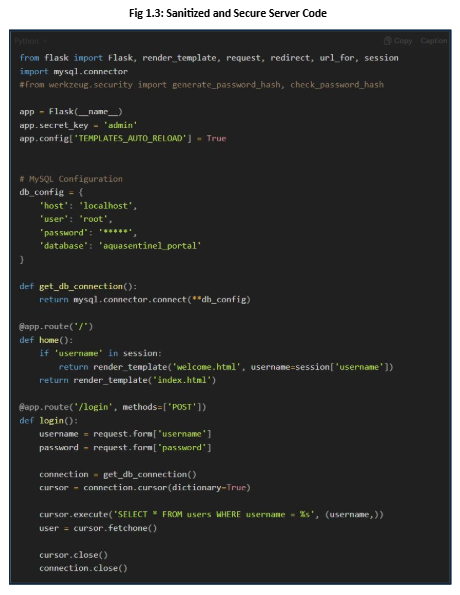
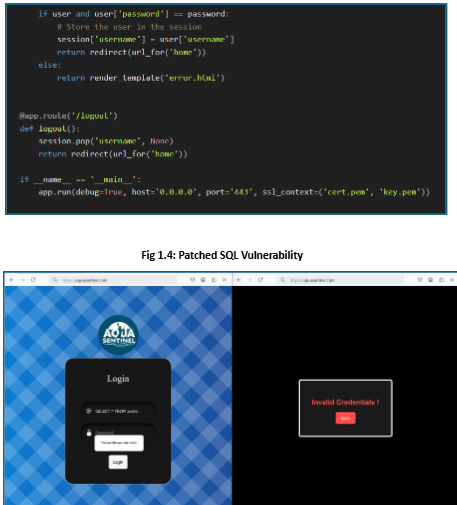
The secure version of the code includes an embedded query, sanitizes the input field, and requires a password constraint to prevent it from being left blank.
Patching Vulnerable Services
Vulnerable FTP server (CVE-2011-2523)
As highlighted in the Penetration Testing report, the organization has a vulnerable version of the vsftpd FTP server. The vsftpd version 2.3.4 contains a backdoor that opens a shell on port 6200/TCP.
Vsftpd, Very Secure FTP Daemon, is an FTP server licensed under GPL. The default FTP server is installed on some distributions like Fedora, CentOS, or RHEL. [2]
This version of the vsftpd was intentionally replaced by the threat actor in the source code of vsftpd version 2.3.4. This vulnerability can be easily exploited by someone with less technical skill using the Metasploit module.
[The Metasploit module] exploits a malicious backdoor that was added to the VSFTPD download archive. This backdoor was introduced into the vsftpd-2.3.4.tar.gz archive between June 30th, 2011, and July 1st, 2011, according to the most recent information available. This backdoor was removed on July 3rd, 2011.[3]
Exploitation
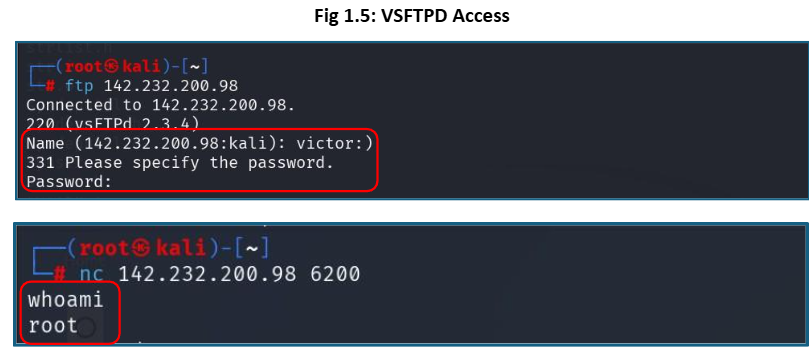
The backdoor can be activated by entering any username that includes a “:)” and then providing any password. After that, a tool like Netcat can be used to access the backdoor on port 6200.
To mitigate this vulnerability, we have updated vsftpd to the latest version. Additionally, it is recommended for the organization to continuously test and patch services, particularly those that are exposed to the internet.
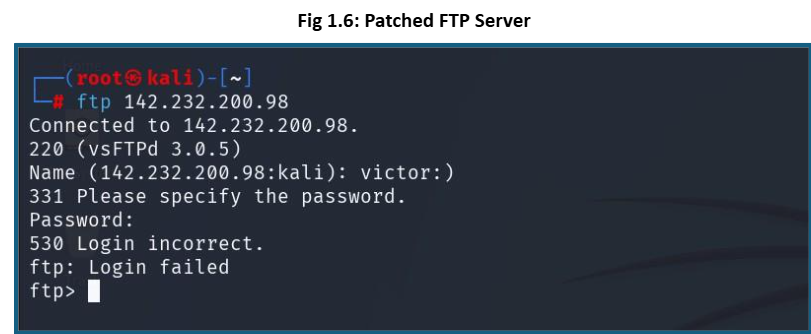
The vulnerability has now been patched, so the attack will no longer be effective.
Vulnerability: Exposed WinRM Service
Windows Remote Management (WinRM) can be vulnerable to exploitation through tools like EvilWinRM when weak or exposed (SQL Injection) credentials are available.
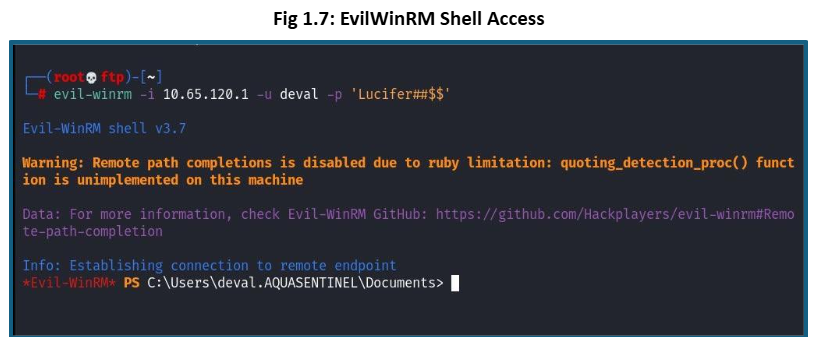
Attackers took advantage of WinRM-enabled devices in Enterprise Network to use tools like EvilWinRM to gain remote shell access to a Windows system, especially in post-exploitation scenarios during lateral movement or privilege escalation.
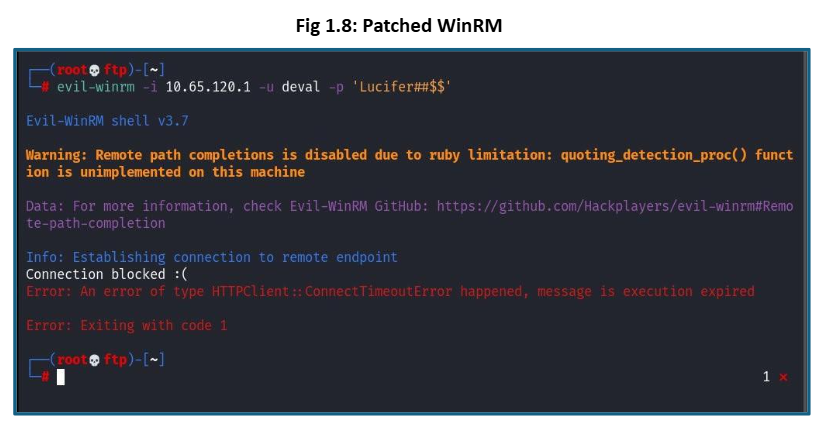
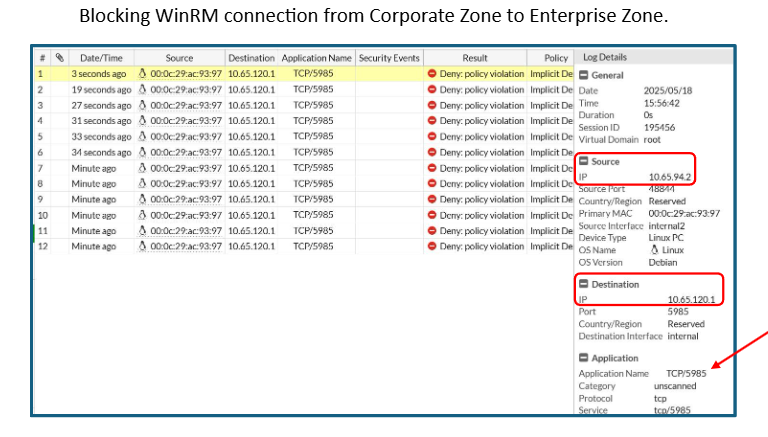
To mitigate this risk, our team has disabled the WinRM service where it’s not required and configured it to only allow connections from specific trusted hosts. Additionally, we will integrate Azure Entra ID to enforce user authentication with multi-factor authentication (MFA), strengthening overall access controls.
Strengthening Network Security
One of the most common reasons why the attacks escalate is the lack of strict network boundaries. In case of an attack, the attacker pivots from one machine to another to achieve the goal. Well- documented and defined network boundaries help to stop the attack from spreading. Above, we identified multiple vulnerabilities that exist in the network. Those vulnerabilities explicitly create a path for an attacker to pivot from attacking the FTP server to hijacking the control system.
Detailed Segmentation
Our team has assessed the organization’s network thoroughly and defined the zones and conduits. We have logically separated devices that share the same function and operate at the same security level in accordance with ISA/IEC 62443.
Logically separating devices will allow us to quickly isolate the infected zones during future cyber attacks. Our team will ensure that the communication between the zones is also secure and well- defined.
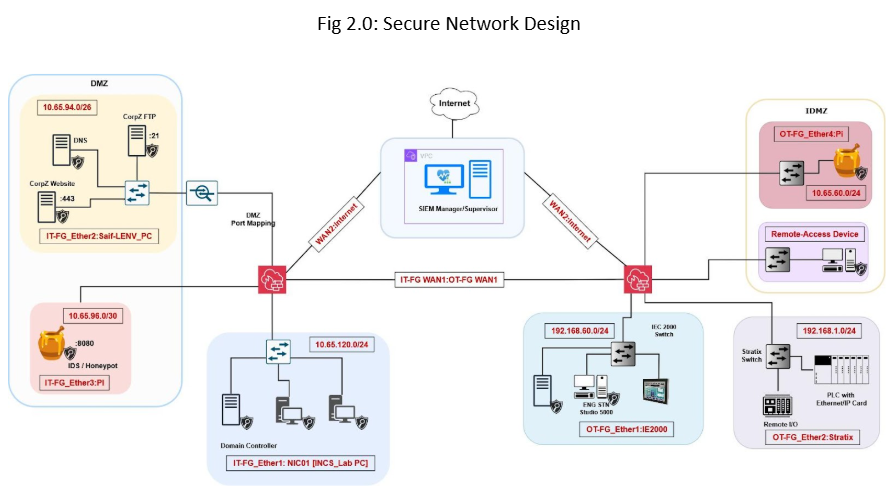
In secure network design, we have thoroughly segmented the network and implemented various security solutions.
As demonstrated in the secure network, we have implemented two FortiGate firewalls, one for each network (IT and OT). Both firewalls are connected together to allow communication between the IT and OT zones. The channel connecting two different zones is encrypted using the Site-to-Site VPN.
Furthermore, our team has configured the network to provide each firewall with its Internet access. This will reduce the attack surface, as the OT zone will no longer depend on the IT firewall for Internet connectivity. This technique enables load balance and efficiency for deep inspection of packets for security threats.
The attack surface is the number of all possible points, or attack vectors, where an unauthorized user can access a system and extract data. [4]
Strict Firewall Policies
Referring to the assessed vulnerable network “Appendix: Weak Network Diagram”, despite having the defined zones, an attacker can still learn and perform an enumeration of the network. To prevent unwanted and unnecessary traffic, our team will implement strict firewall policies that selectively enable the traffic flow based on the protocol and zones.
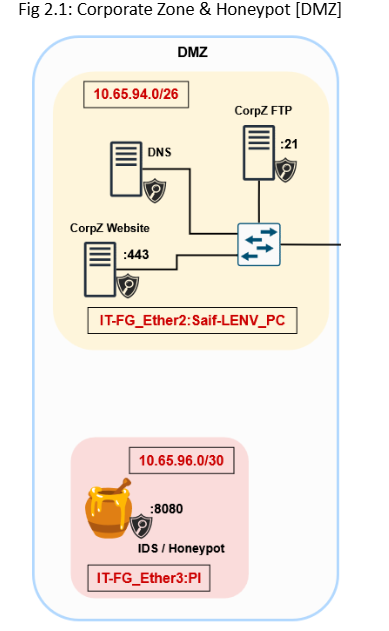
The Corporate Zone has three servers: a DNS server, a Web server, and an FTP Server. In a secure network, the Corporate Zone does not have direct access to the Enterprise Zone, and only certain services are allowed in and out of the Corporate Zone. Services include Hypertext Transfer Protocols [HTTPS:443], File Transfer Protocol [FTP:21], and Domain Name System [DNS:53]. Only these selected services can be accessed, this approach eliminates the chances for an attack to get a reverse shell access from (Fig 1.5).
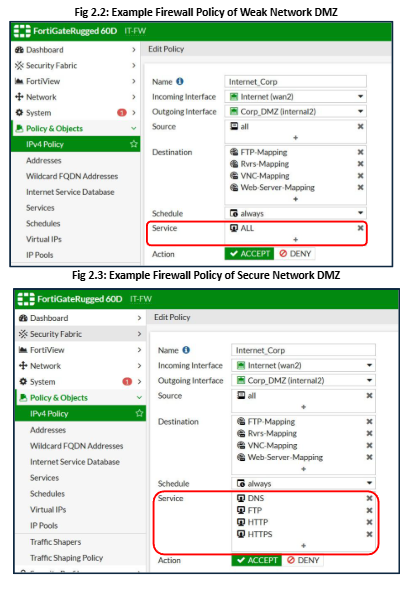
In Example Fig 2.0, we can see that previously, the firewall was allowing all services to come in and out of the DMZ network. This enables a potential pathway for an attacker to open the port on the end device and connect to it via a reverse shell connection (as shown in the Penetration Testing Report and Fig 1.4).
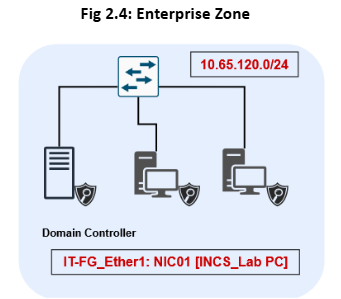
The Enterprise Zone is now secured from any threat occurring in the DMZ and pivoting to the Enterprise Zone. Furthermore, we have restricted WinRM to be only accessible within the Enterprise Zone and disabled direct connection from Enterprise Clients to the OT.
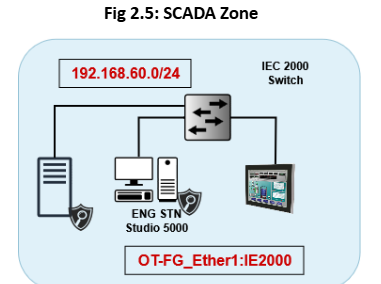
The SCADA Zone is isolated from the rest of the zones in the OT Network. Following our recommendation, having a separate Domain Controller for OT will reduce the possible attack vector. Since it no longer needs to rely on the IT Domain Controller for Authentication and Authorization, this approach enhances security and reduces the possible pathway for the threat actor.
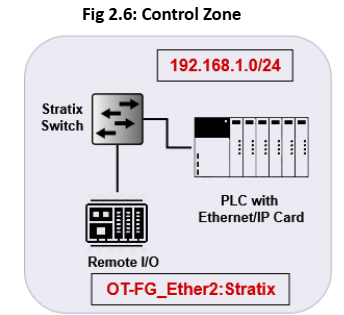
The Control Zone will only be allowed to communicate via the Engineering workstation and the HMI. The Control Zone is completely segmented from the other OT zones. In case of an attack, we would be easily able to isolate the zone and secure it.
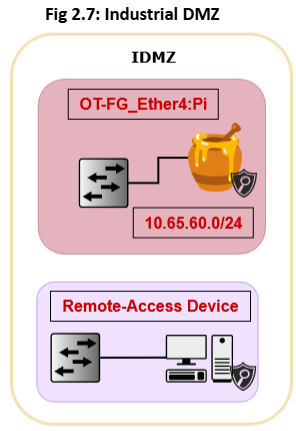
he IDMZ now consists of two zones: the Remote Access Zone and Honeypot. Both zones are completely separated through strict firewall policies.
Separate Zone for Remote Access Devices
In the vulnerable network, we can identify that a device with remote access enabled is directly connected to the control zone network. In the Penetration Testing report, we saw that after compromising that device, the attacker was able to communicate with the PLC. The attacker was able to change and overwrite the PLC program and remove the control of the HMI (Human Machine Interface). This attempt made the plant inaccessible to the operators.
To mitigate this risk, in Fig 2.7, we completely isolated the devices with remote access and combined them into a common zone (refer to Fig 2.0 & 2.7). We enforce strict firewall policies in that zone so that any remote device can not communicate with PLCs directly. Additionally, to connect to the remote device, we will provide a remote access VPN to the company client with Two-Factor authorization for authentication.
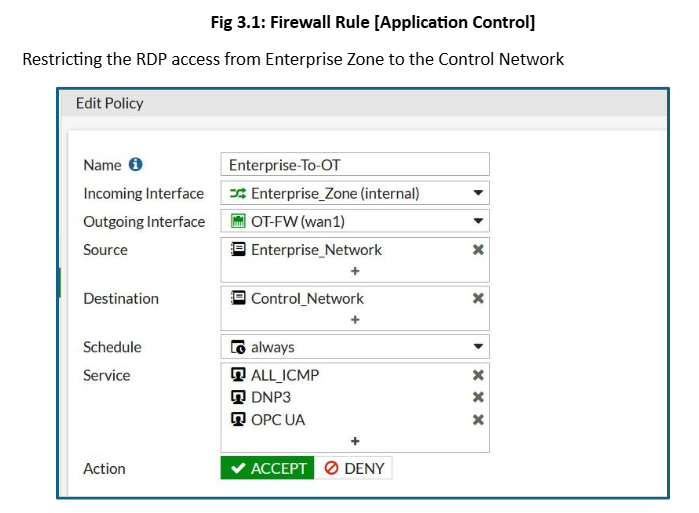
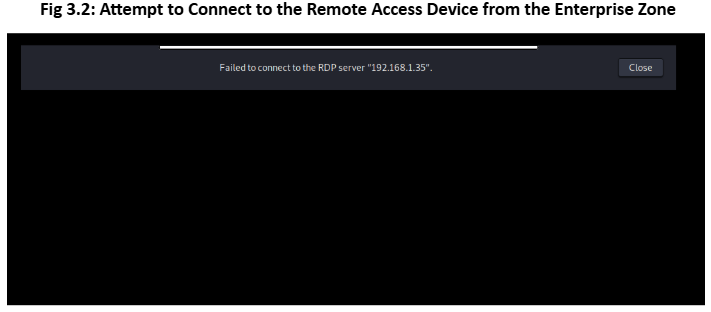
The compromised device from the IT zone was unable to establish an RDP connection to the remote
access device in the OT zone.
Improving Security Posture
After patching the discovered vulnerabilities and poor security measures, our team will move forward with Phase 2: Improving Security Posture. In this phase, we will focus on enhancing the overall security of the network. We will install IDS/IPS, SIEM, Honeypot, and implement IDMZ.
Deploying Honeypots
Our team has deployed KFSensor honeypot to simulate services such as SSH, Telnet, SMTP, HTTP,
and other TCP/UDP ports.
The honeypot looks like a real computer system, with applications and data, fooling cybercriminals into thinking it’s a legitimate target. For example, a honeypot could mimic a company’s customer billing system – a frequent target of attack for criminals who want to find credit card numbers. Once the hackers are in, they can be tracked, and their behavior assessed for clues on how to make the real network more secure.
Honeypots are made attractive to attackers by building in deliberate security vulnerabilities. For instance, a honeypot might have ports that respond to a port scan or weak passwords. Vulnerable ports might be left open to entice attackers into the honeypot environment, rather than the more secure live network. [5]
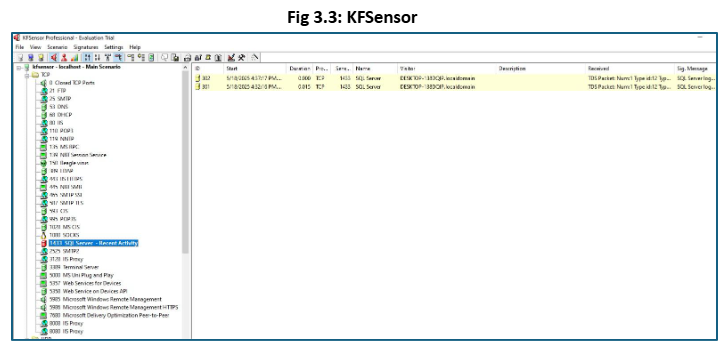
Deploying KFSensor will allow us to lure the attacker into thinking that they are targeting the legitimate system. Additionally, we will be able to collect the data about the attacker’s activity and use it to improve our security model.
Installing Intrusion Detection & Prevention System (IDS/IPS)
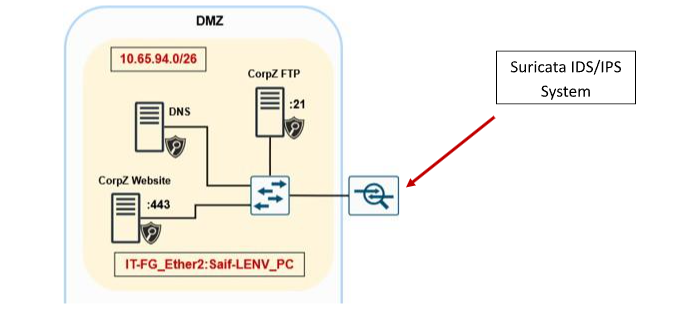
To prevent and log unusual activities, we have installed Suricata, a network-based IDS/IPS system between the Internet and the Demilitarized Zone. The IDS/IPS will monitor traffic entering and exiting the DMZ, where we plan to install a honeypot. This approach plans to help the organization mitigate risks associated with vulnerabilities in the DMZ.
An Intrusion Detection System (IDS) is a cybersecurity solution designed to monitor network traffic and devices for anomalies, malicious activities, and policy violations (e.g., Port scanning or Nmap Scans).
The installed NIDS (Network IDS) will monitor traffic across a network by identifying known patterns of suspicious activity. They inspect both sides of network communications and, in IPS mode, can block malicious traffic when a threat is detected.
To install the Suricata IDS/IPS and configure it for monitoring, please refer to our “Suricata: IDS/IPS Guide”.
Endpoint Detection and Response (EDR)
Security of end devices is important; therefore, along with NIDS, our team has installed Wazuh agents on the end computers to monitor the system for threats, vulnerabilities, and compliance.
Endpoint Detection and Response (EDR) focuses on identifying and addressing security threats at the endpoint level, such as laptops, desktops, and mobile devices. EDR solutions continuously monitor endpoint activities and analyze data to detect potential threats in real time. These tools offer advanced capabilities, including threat detection, investigation, and response, enabling security teams to identify and mitigate risks quickly. [6]
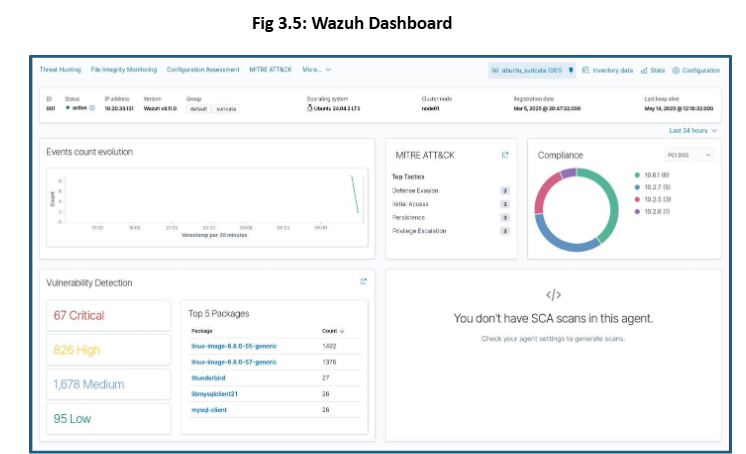
We have deployed the EDR agents on every computer in both IT and OT zones. The EDR manager (Wazuh Manager) is installed on the cloud for centralized monitoring of all devices.
Security Information and Event Management (SIEM)
Continuous monitoring is very important for preventing emerging cyber threats. For threat detection, threat hunting, and anomaly detection, logs are important. Along with logs, how they are presented is also very important.
Security information and event management, or SIEM, is a security solution that helps organizations recognize and address potential security threats and vulnerabilities before they have a chance to disrupt business operations. [7]
Our team has created a custom dashboard on Wazuh Manager (SIEM) to integrate other security measures such as Suricata IDS/IPS, Endpoint Agents, and Honeypots. All of these security measures will send logs to two individual SIEM platforms, Wazuh SIEM and Splunk. We have enabled syslog and SNMP on FortiGate firewalls and Cisco networking devices to send logs to the SIEM servers. This setup will allow us to monitor the organization’s network as a whole.
Industrial Demilitarized Zone (IDMZ)
In our secure network design, we have established separate internet connectivity for both the IT and OT firewalls. Following that structure, we have also implemented the IDMZ for the OT network. The purpose of having a separate IDMZ is that we have separate Internet access and a domain name for that network. This can attract the attacker to scan the network; therefore, implementing IDMZ will allow us to add Honeypots and Remote Access Devices in the network without compromising the overall security of the OT network.
The Industrial Demilitarized Zone (IDMZ), also referred to as the perimeter network, is a buffer that enforces data security policies between a trusted network (industrial zone) and an untrusted network (enterprise zone). The IDMZ is an additional layer of defense to securely share ICS data and network services between the industrial and enterprise zones. [8]
Conpot is an ICS honeypot with the goal to collect intelligence about the motives and methods of adversaries targeting industrial control systems. [9]
In the IDMZ, we have installed the Conpot, an ICS (Industrial Control System) honeypot. Along with
that, we have created a separate zone for remote access devices within an IDMZ.
To install Conpot, refer to https://pypi.org/project/Conpot/
Recommendations
Phase 3 provides recommendations and ideas for increasing the immune system of the network. Phase 1 & 2 provides the countermeasures and patches to the vulnerabilities and solve most of the vulnerabilities. However, the attack surface can be reduced by eliminating the attack vector. However, the recommendations are optional, and not acting on them will not compromise or make the network vulnerable.
Service Migration
In the Corporate Network (DMZ), we have both a web server and an FTP server. If these services are compromised in the future, they could expose information about the internal network. While we have enforced strict policies to prevent attackers from pivoting within the network, there is still a risk that an attacker could gather information to plan a more extensive attack.
We recommend migrating these services to the cloud, which would isolate them from the organization’s internal network. This approach would allow us to share security concerns with the cloud service providers. Additionally, moving to the cloud would simplify server provisioning and help reduce the overall attack surface.
Separate Domani Controller for OT network
In the vulnerable network (see Appendix for reference), OT workstations depend on the Domain Controller located in the Enterprise Zone. This dependence creates a potential pathway for an attacker to move from the Domain Controller to the OT network. While strict firewall policies can help limit this interaction, they are not the most effective solution.
We recommend installing a separate Domain Controller specifically for the OT environment. By eliminating the dependence on the IT Domain Controller, we can thoroughly separate the IT and OT environments. This separation allows both environments to operate independently while still maintaining a secure, encrypted site-to-site (S2S) connection between them.
Risk Analysis
Table 1.1
Scenario | Impact | Likelihood | Total Risk | TAME |
Team member falls sick | 4 | 2 | 8 | All 3 team members are qualified to perform all the tasks in the scope. In case, a team member is sick for an extended period, the other two team members can perform the sick team member’s tasks |
PLC fails | 5 | 1 | 5 | In case a PLC fails, the team has redundant PLCs that they will use. |
Team members not attending meetings | 3 | 1 | 3 | The team member will be dealt with according to the infractions specified in the team charter. |
Team member facing challenges in performing the assigned tasks | 3 | 2 | 6 | The other team members will guide the team member to overcome his challenges. |
Appendix
Network Design
Vulnerable Network Diagram Fig 3.8
IP Tables (Secure Network)
Table 1.2 – 1.7
Enterprise Zone | 10.65.120.0/24 | SCADA Zone | 192.168.60.0/24 | |
Purple Station – 3 | 10.65.120.120 | Purple Station – 4 | 192.168.60.25 | |
Domain Controller | 10.65.120.1 | Engineering Stn | 192.168.60.1 | |
Client 1 | 10.65.120.12 | HMI | 192.168.60.77 | |
Client 2 | 10.65.120.2 | |||
Corp_Zone DMZ | 10.65.94.0/24 | Control Zone | 192.168.1.0/24 | |
Host PC | 10.65.94.120 | Allen Bradley PLC | 192.168.1.174 | |
Web Server | 10.65.94.1 | Remote I/O | 192.168.1.168 | |
FTP Server | 10.65.94.2 | |||
PiHole DNS | 10.65.94.3 | |||
IDMZ | 10.65.60.0/24 | |||
Honeypot | 10.65.96.0/24 | Raspberry Pi (Conpot) | 10.65.60.61/25 | |
KFSesnsor | 10.65.96.2 | Remote Access Device | 10.65.60.129/25 | |
References
[1] | Kingthorin, zbraiterman, “SQL Injection | OWASP Foundation,” OWASP, [Online]. Available: https://owasp.org/www-community/attacks/SQL_Injection. [Accessed 5 May 2025]. |
[2] | I. Spiros, “What is vsftpd or Very Secure FTP Daemon,” MVSP, 23 June 2019. [Online]. Available: https://www.mvps.net/docs/what-is-vsftpd-or-very-secure-ftp-daemon/. [Accessed 5 May 2025]. |
[3] | H. X, “VSFTPD v2.3.4 Backdoor Command Execution,” RAPID7, 30 May 2018. [Online]. Available: https://www.rapid7.com/db/modules/exploit/unix/ftp/vsftpd_234_backdoor/. [Accessed 5 May 2025]. |
[4] | Fortinet, “What Is An Attack Surface,” FORTINET, [Online]. Available: https://www.fortinet.com/resources/cyberglossary/attack-surface. [Accessed 25 January 2025]. |
[5] | Kaspersky, “What is a honeypot?,” Kaspersky, [Online]. Available: https://www.kaspersky.com/resource-center/threats/what-is-a-honeypot. [Accessed 9 May 2025]. |
[6] | Palo Alto Networks, “What Is Endpoint Detection and Response (EDR)?,” Palo Alto Networks, [Online]. Available: https://www.paloaltonetworks.ca/cyberpedia/what-is-endpoint-detection- and-response-edr. [Accessed 9 May 2025]. |
[7] | IBM, “What is security information and event management (SIEM)?,” IBM, 23 June 2023. [Online]. Available: https://www.ibm.com/think/topics/siem. [Accessed 9 May 2025]. |
[8] | P. Ackerman, “Level 3.5 – The Industrial Demilitarized Zone,” in Industrial Cybersecurity, Packt Publishing, 2017. |
[9] | Python Packaging , ” Conpot,” Python Packaging , 9 August 2018. [Online]. Available: https://pypi.org/project/Conpot/. [Accessed 15 May 2025]. |