M. JAHIN
Advanced Cybersecurity SOC Lab – Threat Detection, Monitoring, Incident Response & Vulnerability Management
This project simulates a fully functional enterprise-grade Security Operations Center (SOC) environment using Fortinet, Cisco & Palo Alto hardware and integrated cybersecurity platforms (FortiSIEM, Suricata, Tenable Nessus). This project performs Cyberattacks and supports real-time Threat Detection & Monitoring, Incident Response, and continuous Vulnerability Management, showcasing the workflows of a professional Tier I/II SOC Analyst & SIEM Engineer
Advanced Cybersecurity (SOC) Lab for Threat Detection, Monitoring, Incident Response & Vulnerability Management
By Md Muhtashim Jahin Date: Mar 11, 2025
This project simulates a fully functional enterprise-grade Security Operations Center (SOC) environment using Fortinet, Cisco & Palo Alto hardware and integrated cybersecurity platforms (FortiSIEM, Suricata, Tenable Nessus). This project performs Cyberattacks and supports real-time Threat Detection & Monitoring, Incident Response, and continuous Vulnerability Management, showcasing the workflows of a professional Tier I/II SOC Analyst & SIEM Engineer
Overview of Lab
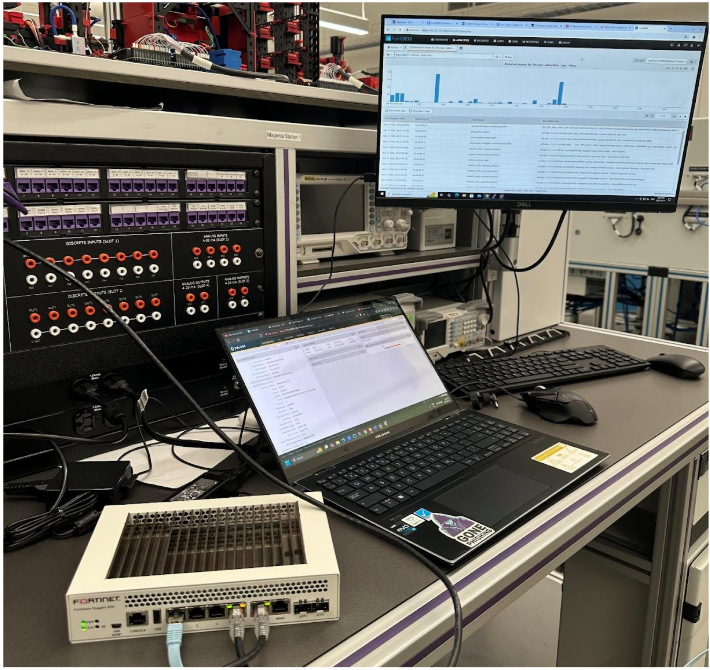
The lab infrastructure consists of:
Firewalls: FortiGate Rugged 60D (Hardware) and Palo Alto NGFW (VM)
Router: Cisco ISR 4300 Router (Connected through Patch Panel), Cisco CSR Router (VM)
Switch: Cisco Catalyst C9200-48P (Connected through Patch Panel)
SIEM: FortiSIEM (Security Monitoring, Log Management Solution, Log Collector, Ticketing)
IDS: Suricata (NIDS/Network Intrusion Detection System)
Vulnerability Scanner: Tenable Nessus (API integrated with FortiSIEM)
All network devices and security appliances forward Syslog and SNMP logs to FortiSIEM, enabling centralized event correlation and Alert Generation.
Network Diagram
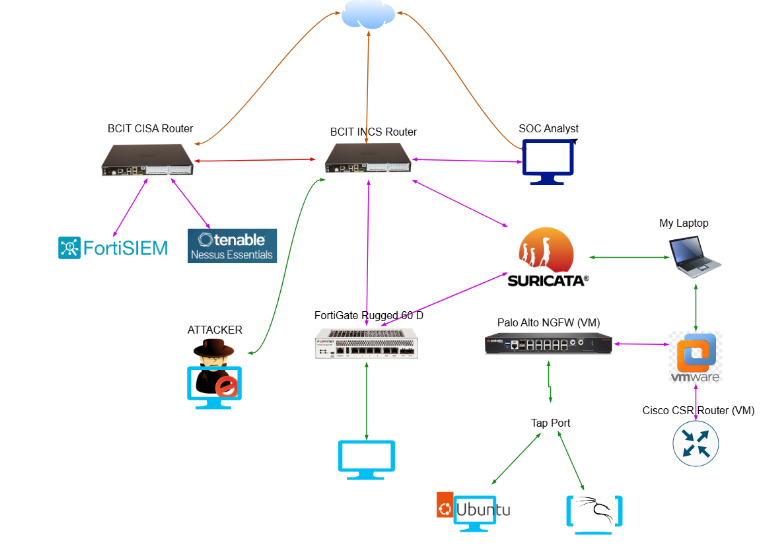
Custom correlation rules were created within FortiSIEM to generate alerts based on event severity, ranging from low to critical. To validate detection and response capabilities, a series of controlled attacks were executed from an attacker machine connected to the internet, including:
- Distributed Denial of Service (DDoS) Attacks
- Credential Dumping
- Dictionary Attacks
These simulated threats triggered FortiSIEM alerts, which were promptly analyzed and triaged. Incidents were tracked using FortiSIEM’s integrated ticketing system, with documented workflows for investigation, containment, and remediation.
Active incident response was performed by blocking malicious IP addresses through firewall policies on both FortiGate and Palo Alto devices. Tickets were closed after verification of mitigation effectiveness via log review and vulnerability reassessment using Nessus.
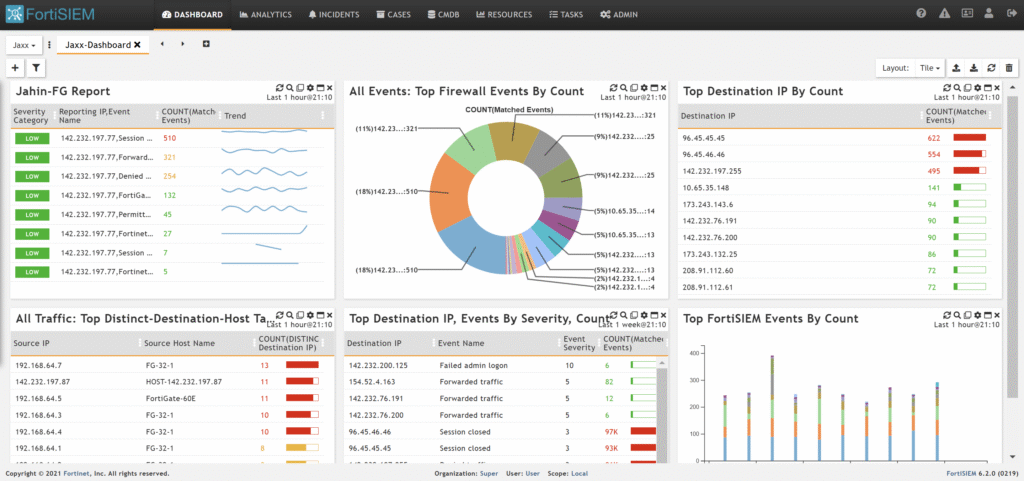
FortiSIEM Dashboard
Component Configurations
Palo Alto NGFW:
- NAT.
- Policy Creation
- DoS Protection.
- TAP port for continuous packet capture, enabling deep traffic visibility and forensic analysis.
FortiGate Rugged 60D:
- NAT.
- Policy Creation
- DoS protection.
- Application Control.
- SSL inspection.
- Web Filtering.
Suricata IDS:
Edited detection rules to generate alerts on:
- Port scans
- SQL injection attempts
- ICMP ping probes originating from outside the network
FortiSIEM:
- Centralized log ingestion via Syslog and SNMP from all devices.
- Created custom correlation rules to generate severity-based alerts.
- Managed incident lifecycle using the integrated ticketing system.
- Custom Dashboard
Tenable Nessus:
- Integrated via API with FortiSIEM.
Cisco CSR Router:
- Provided core routing and switching infrastructure to support lab network segmentation and traffic flow.
This lab reflects a real-world security operations environment that strengthens skills in threat detection, incident response, and vulnerability remediation using best-in-class hardware and software tools.
Connecting FortiGate, Palo Alto NGFW, Cisco CSR Router to send logs to FortiSIEM.
Configuring SNMP on FortiGate
- Go to System > SNMP and create an SNMPv1/2 with the following information
Parameter | Value |
Community Name | Up to you |
IP Address | FortiSIEM IP Address |
Agent | Enable |
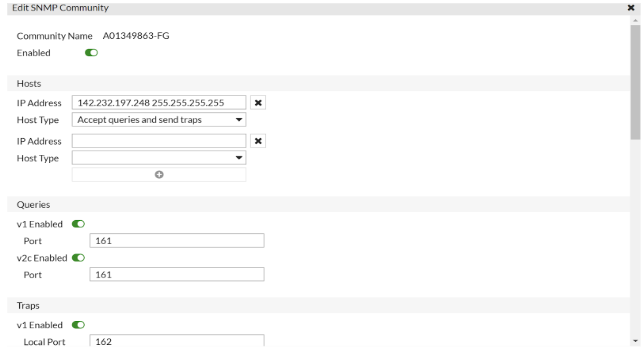
Go to FortiGate> Interfaces, in administrative access, allow SNMP on the port connected to the NAT.
Configuring Syslog on FortiGate
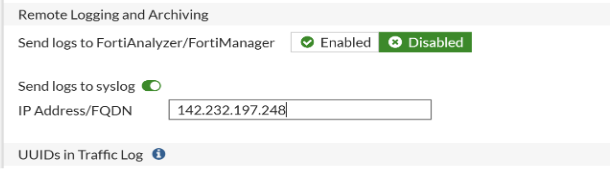
- Go to Log& Report > Log Settings> Enable Send the Log to syslog and enter the IP Address:142.232.197.248
Go to FortiSIEM and navigate to Analytics> Attributes. Provide the following information:
Attribute | Value |
Reporting IP | Your FortiGate IP Address |
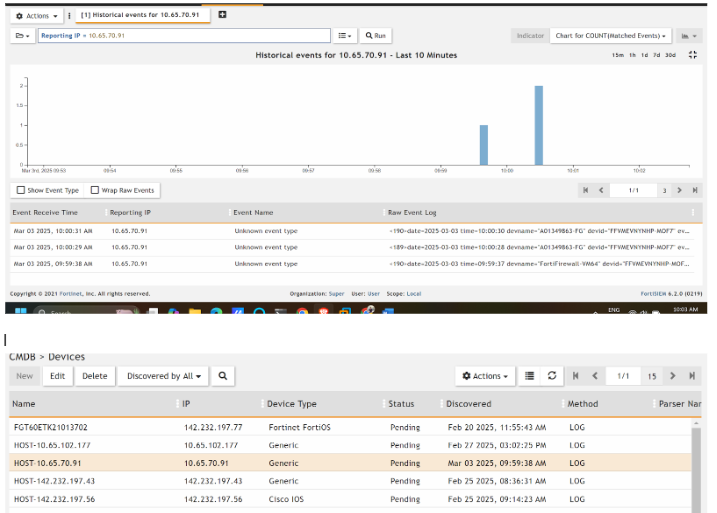
n CMDB>Firewalls, to know your Firewall has been added successfully
Palo Alto NGFW SNMP & Syslog log forwarding to FortiSIEM
Configure SNMP
- Log in to the management console for your firewall with administrator privileges.
- In the Device tab, click Setup.
- Click on MGMT Interface Services, make sure SSH, Ping, and SNMP are selected.
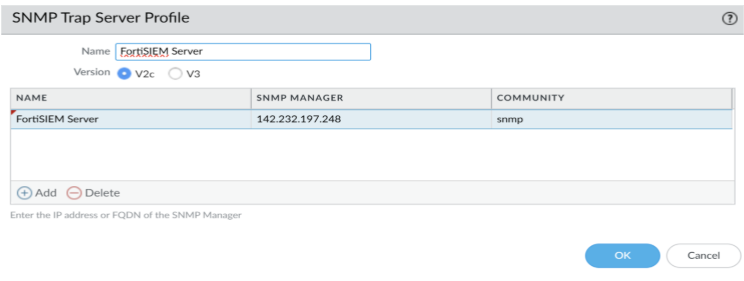
- Go to Device> SNMP Trap and set your SNMP Manager and Community String. SNMP Manager should be Collector or Supervisor IP address (142.232.197.248).
Configure Syslog
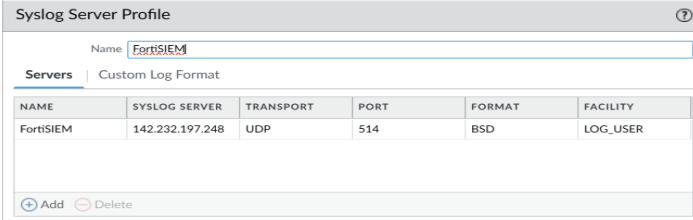
- Create a profile for Syslog in the Device > Syslog. Syslog Server should be Collector or Supervisor IP address (142.232.197.248)
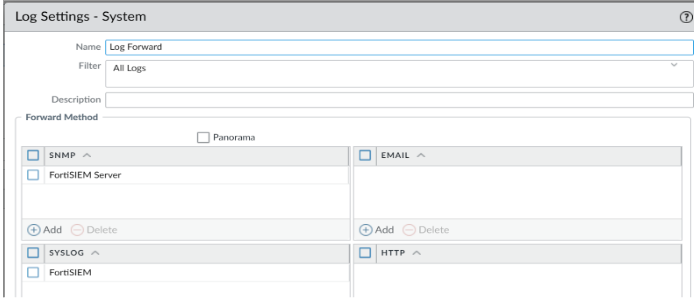
Assign the SNMP and Syslog Profile you have created in the previous step in the Device > log Settings> System
Cisco CSR Router Syslog logs forward to FortiSIEM.
(config)# logging trap debugging
(config)# logging host [YOUR FortiSIEM SERVER IP] transport udp port 514
Connect Nessus API to FortiSIEM
Step 1: Enter Credentials
Go to ADMIN>SETUP> CREDENTIALS>New in FortiSIEM to create credentials.
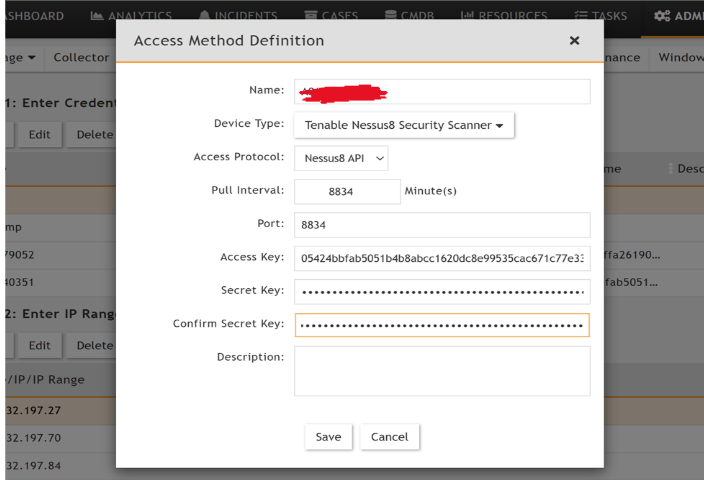
Step 2: Enter IP Range to Credential Associations
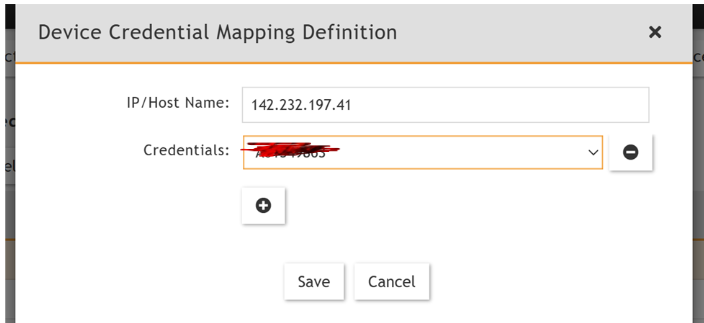
Assign Nessus IP to the credentials you created in step1 with following information:
IP/Host Name: 142.232.1xx.x (Nessus Essentials host IP).
Credentials: Name of profile you created in Step1
Go to ADMIN -> Setup -> Pull Events
The yellow icon beside the Nessus pull job should turn green

Threat Detection, Incident Response & Vulnerability Management
Vulnerability Management: Vulnerability management is a proactive process that involves identifying, assessing, prioritizing, and remediating security weaknesses of Systems & Software.
Nessus Essentials is a free vulnerability management tool, specifically a vulnerability scanner, developed by Tenable. It’s used to identify security weaknesses and vulnerabilities in systems, software, and networks before attackers can exploit them. Nessus scans target systems, analyzes them for known vulnerabilities, and provides detailed reports with remediation recommendations.
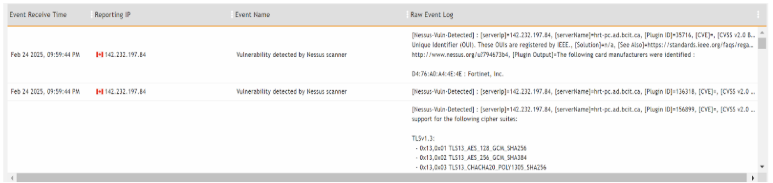
I have integrated the Nessus Scanner API to FortiSIEM.
Nessus Logs in FortiSIEM.
Threat Detection: Threat detection using SIEM (Security Information and Event Management) involves leveraging a centralized platform to monitor, analyze, and correlate security data from various sources to identify potential threats and security incidents. SIEM systems use log data, security alerts, and threat intelligence to detect unusual activities, policy violations, and suspicious patterns indicative of cyberattacks or insider threats.
All components in our Network are Sending Logs to FortiSIEM.
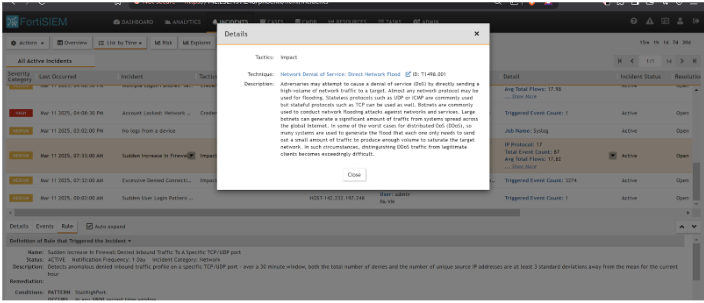
At first, the attacker launched a DDoS Attack on FortiGate Rugged 60D Firewall.
We can detect that on FortiSIEM.
DDoS Threat Detection on FortiSIEM
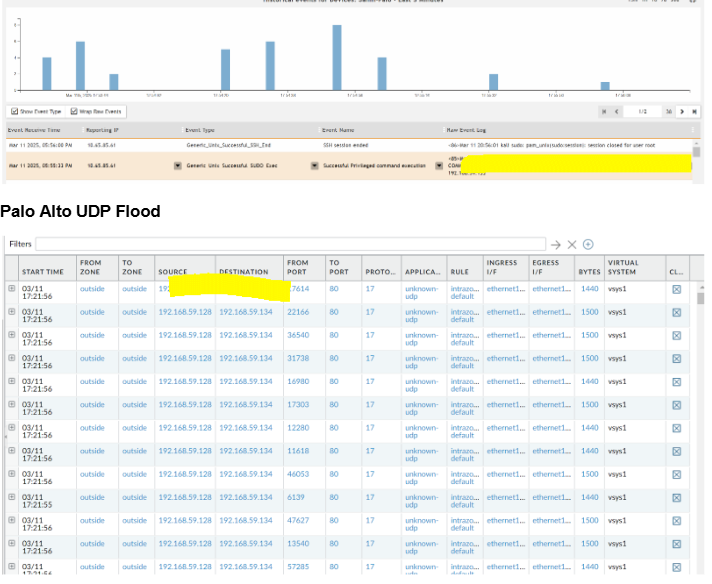
The attacker launched a UDP Flood on the Palo Alto Firewall.
UDP Flood Detection on FortiSIEM
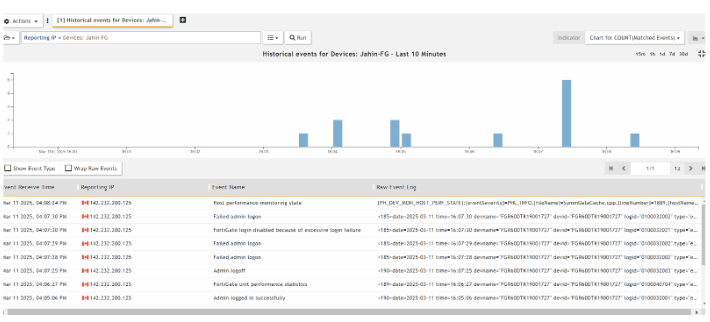
Later, the Attacker did a Credential Dump and a Brute-Force attack on the FortiGate Firewall. Through FortiSIEM, I can detect that FortiSIEM generated Incidents and Events, the severity is high, as I made the rule to generate a High Alert.
Difference between Credential Dump and Brute-Force Attack: A Credential Dump attack and a Brute-Force attack are both methods used by attackers to gain unauthorized access to accounts, but they differ in their approach.
A credential dump attack leverages lists of leaked or stolen username/password combinations, often obtained from previous data breaches.
A brute force attack, on the other hand, systematically tries different username and password combinations until the correct one is found, regardless of whether they are leaked or not.
FortiGate Credential Dump Attempt Detection
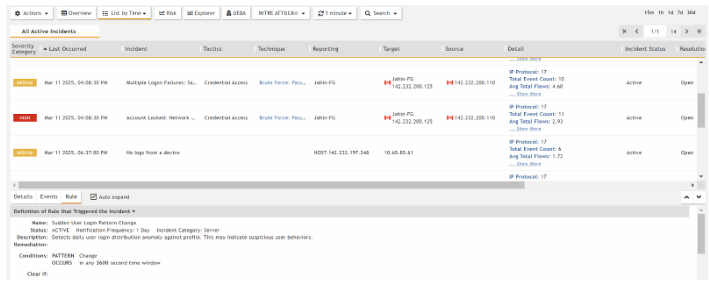
Brute-Force Incident Alert was generated by FortiSIEM after detecting the brute force attempt pattern mentioned in the rule.
Incident Response
Incident response in a Security Operations Center (SOC) is the process of detecting, analyzing, containing, and recovering from security incidents like cyberattacks or data breaches.
Incident Response Plan for Detected Threats
Incident Type: Denial-of-Service (DoS) / UDP Flood Attack
- Detection & Alerting
- FortiSIEM received Syslog/SNMP alerts from both FortiGate and Palo Alto firewalls.
- Predefined correlation rules triggered security incidents based on:
- Unusual volume of traffic
- Repeated UDP packet patterns
- Connection attempts to closed ports (port 80 on Palo Alto, ICMP Echo DDoS Attack on FortiGate)
- Alerts tagged as “Sudden Increase in Firewall Denied Inbound Traffic/DDoS” with Severity.
2. Initial Triage
I reviewed the incidents in FortiSIEM’s incident
- management console.
- Verified:
- Source IPs and affected destination interfaces/services.
- Traffic volume and frequency from the logs.
3. Investigation
- Performed log analysis across:
- FortiGate & Palo Alto logs in FortiSIEM.
- Suricata IDS alerts (for any lateral or additional abnormal behavior).
- Used FortiSIEM dashboards and event drilldowns to:
- Confirm multiple high-rate connections from specific external IPs.
- Identify patterns matching UDP flood and generic DDoS behavior.
4. Containment
- Added firewall block rules:
- Blocked attacker IP (142.232.200.110 & 192.168.59.128) on both FortiGate and Palo Alto.
- Verified containment by:
- Confirmed drop in alert volume.
5. Eradication & Recovery
- Ensured firewalls were no longer receiving malicious traffic.
- Rechecked Suricata and FortiSIEM to confirm no residual activity.
- Ran Nessus scan to ensure no new vulnerabilities were exposed or exploited during the attack.
6. Incident Closure
- Updated the ticket in FortiSIEM with:
- Description of the attack
- Source IPs involved
- Timeline of detection and response
- Actions taken (blocking, validation, containment)