M. JAHIN
SURICATA


Intrusion Detection System
- An Intrusion Detection System (IDS) is a cybersecurity solution designed to monitor network traffic and devices for anomalies , malicious activities , and policy violations (e.g.: Port scanning or Nmap Scans).
- An IDS can be implemented as software on a device, dedicated hardware, or a cloud- based solution.
- An IDS operates in passive mode. It only detects and reports potential threats, without taking any action, unlike an IPS.
- IDS can be implemented alongside Honeypots and Canaries .
- Types of IDS: Network-based, Host-based, Protocol-based, Application Protocol-based and Hybrid.
Common IDS Types
Network-based Intrusion Detection System (NIDS)
NIDS monitors traffic across a network by identifying known patterns of suspicious activity. They inspect both sides of network communications and, in IPS mode, can block malicious traffic when a threat is detected.
Typically, NIDS is connected to the network through a SPAN/mirror port or a network tap, allowing them to capture and analyze traffic without affecting network operations (e.g.: Snort, Suricata).
Host-based Intrusion Detection System (HIDS)
HIDS agent is installed on a host device (a server or workstation) to monitor and report system activities, application logs, and system calls.
It focuses on monitoring the device’s internal behaviour such as running processes and events, Registry settings and Network traffic (e.g.: OSSEC , Tripwire).
IDS/IPS can and can’t do


- Monitor network traffic
- Detect known threats
- Identify Anomalies
- Block malicious traffic (IPS only)
- Provide Forensic Data
- Detect zero-day attacks reliably
- Remediate compromised systems
- Replace firewalls
- Prevent insider threats
- Cannot fully eliminate false positives
Suricata
- Suricata is a high performance, open-source netw ork analysis and threat detection software used by many organizations and embedded by major vendors to protect their assets.
- Suricata is developed and managed by OISF (Open Information Security Foundation).
- It provides Real-time analysis of network traffic from layer 3 to layer 7.
- Support for multi-threading and hardw are acceleration, allowing efficient use of hardware.
- Suricata can integrate with platforms like the Elastic Stack for log management and can be used in conjunction with Wazuh or Splunk for enhanced security monitoring.
Installation & Configuration
Suricata can be installed on OS X, Linux and Windows .
It can be downloaded from its official web site: https://suricata.io/download/ Suricata can be configured to operate in two different modes.
- Active (IPS): Suricata is deployed in-line to prevent intrusions by blocking or dropping malicious packets in real-time.
- Passive (IDS): Suricata monitors network traffic, detects intrusions, and generates alerts without blocking the traffic. It is placed out of band within the network infrastructure.
Installation & Configuration
We will be using an Ubuntu server (latest version).
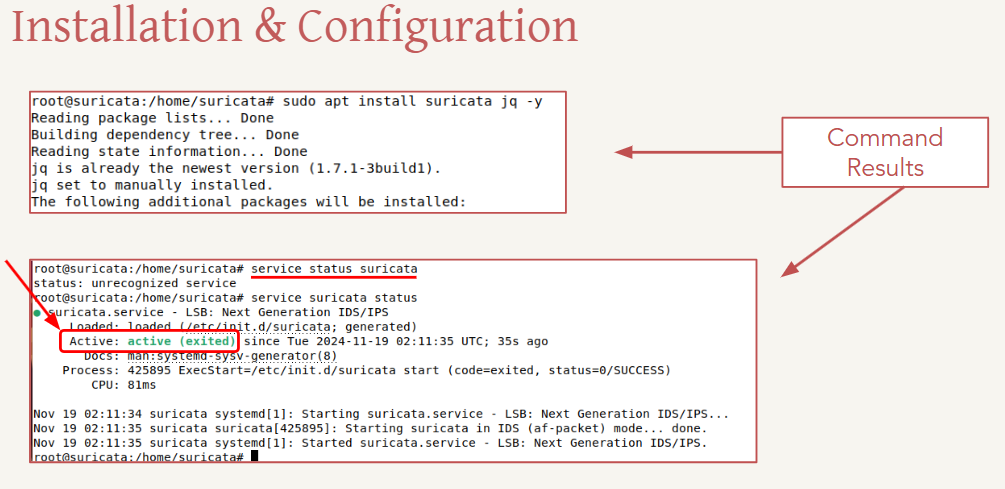
To install Suricata we must first add the official OISF repository by this commands:
- sudo apt-get install software-properties-common
- sudo add-apt-repository ppa:oisf/suricata-stable
- sudo apt update
- sudo apt install suricata jq
- sudo systemctl status suricata
Configuration Files
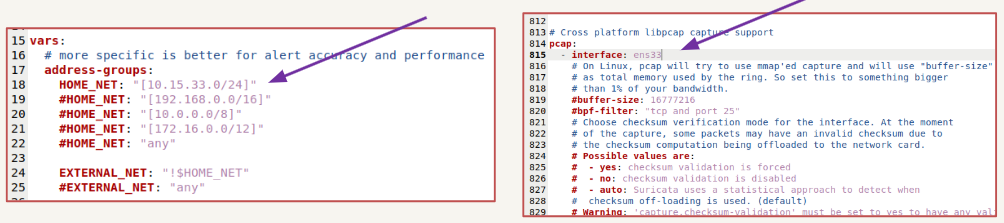
- To effectively monitor network traffic, we must specify the correct interfaces and the appropriate netw ork address.
- Suricata’s configuration are stored in the suricata.yaml file, which is located in the /etc/suricata/ directory.
Rules
- Rules are a set of instructions that tell Suricata how to detect attacks, unusual behaviour, or specific network events.
- For example, a rule might look for a known malware signature, an unauthorized login attempt, or a large data transfer to an unfamiliar server.
- Suricata provides predefined rules for various scenarios, and custom rules can be configured to suit our environment.
- It compares network packets against predefined rules. If a packet matches, the configured action determines whether to drop or log the traffic.
Suricata rules
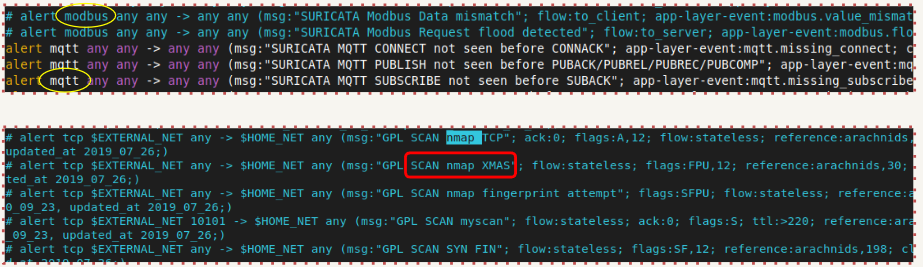
- Not all rules are enabled by default, a pound symbol indicates a disabled rule.
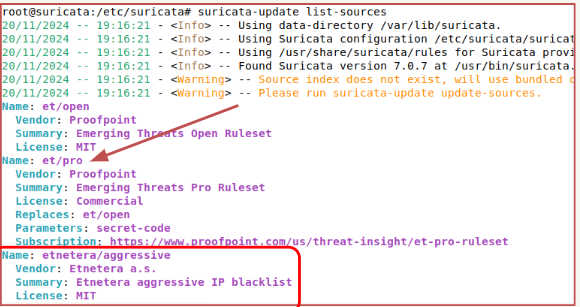
- Suricata allows us to download rules from various sources. You can view the list of available sources by entering the command: suricata-update list-sources.
- Selected rules can be enabled by the command suricata-update enable <source-name>
- After enabling the source, you must update the rules by entering suricata-update
Custom rules can be created and added to the Suricata configuration. Rules Examples;
- A suspicious ping from the Corporate Network to the ICS Network. alert icmp $CORP_NET any -> $ICS_NET any (msg: ” Suspicious PING Detected”; sid:1; rev:1;)
- Detecting a Brute Force attack alert tcp any any -> any 22 (msg:” Potential SSH Brute-Force Attack”; flags:S; threshold:type both, track by_src, count 5, seconds 60; sid:100002; rev:1;)

Configuration Test
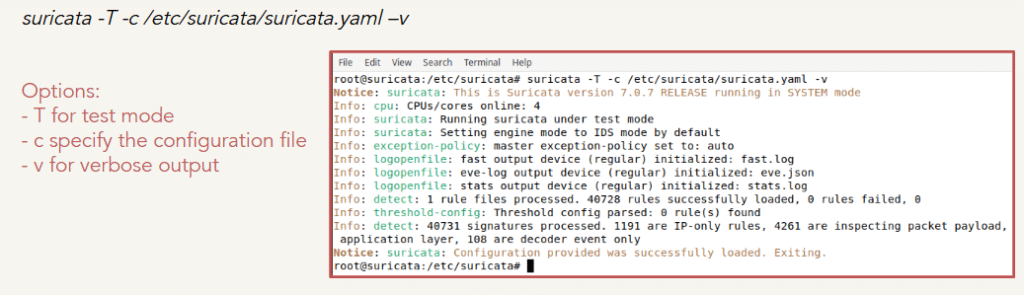
Before running Suricata, we can execute the configuration file in the test environment to verify whether it detects the correct interface, utilizes the rules, generates .json logs, and so on.
Summary
- We learned about IDS and the different types, including NIDS and HIDS.
- We explored the purpose and use of IDSs.
- Next, we studied Suricata, including the supported platforms and its different modes of operation, such as IPS and IDS.
- We went through the installation process of Suricata, starting with adding the repository followed by the actual installation.
- After installation, we configured the suricata.yaml file and reviewed the rules associated with Suricata.
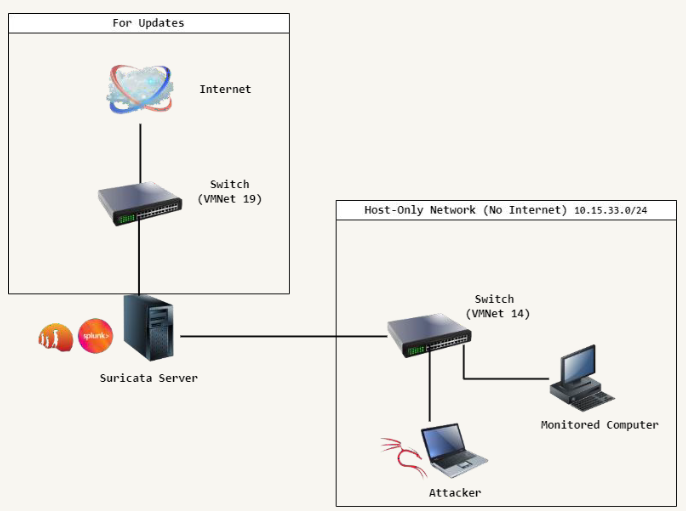
Demonstration Topology
References
- Suricata – https://suricata.io/
- OISF – https://oisf.net/
- Splunk – https://www.splunk.com/
- Ubuntu – https://ubuntu.com/download/server
- Documentation – https://docs.suricata.io/en/latest/install.html
- IDS/IPS – https://www.paloaltonetworks.ca/cyberpedia/what-is-an-intrusion-detection-system-ids https://www.ibm.com/topics/intrusion-detection-system